Buying a new TV is exciting until you realize that size matters more than you thought. A 65-inch television can completely transform your living room, bedroom, or home theater, but only if it actually fits your space. Many people assume that “65 inches” refers to the width of the screen, only to be surprised when the TV arrives and dominates the wall or worse, doesn’t fit on the TV stand at all.
That’s where understanding 65-inch TV dimensions becomes essential.
In this detailed guide, we’ll break down 10 65 inch TV dimensions, explain how they vary by brand and model, and help you confidently choose the right TV for your room. Whether you’re mounting your TV on the wall, placing it on a console, or designing a home theater, this article will give you everything you need to know before making your purchase.
What Does “65 Inch TV” Actually Mean?
Before diving into exact measurements, let’s clear up one of the biggest misconceptions.
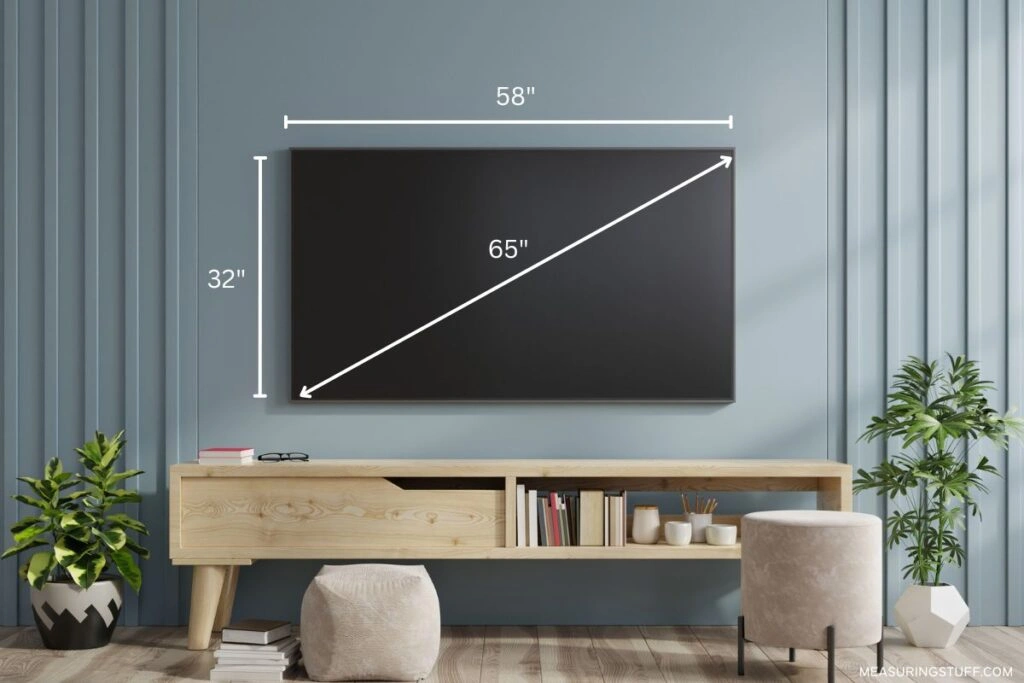
The 65 inches refers to the diagonal screen size, measured from one corner of the screen to the opposite corner. It does not represent the width or height of the TV.
Because of this, many buyers underestimate how wide and tall a 65-inch TV really is once bezels, stands, and frames are included.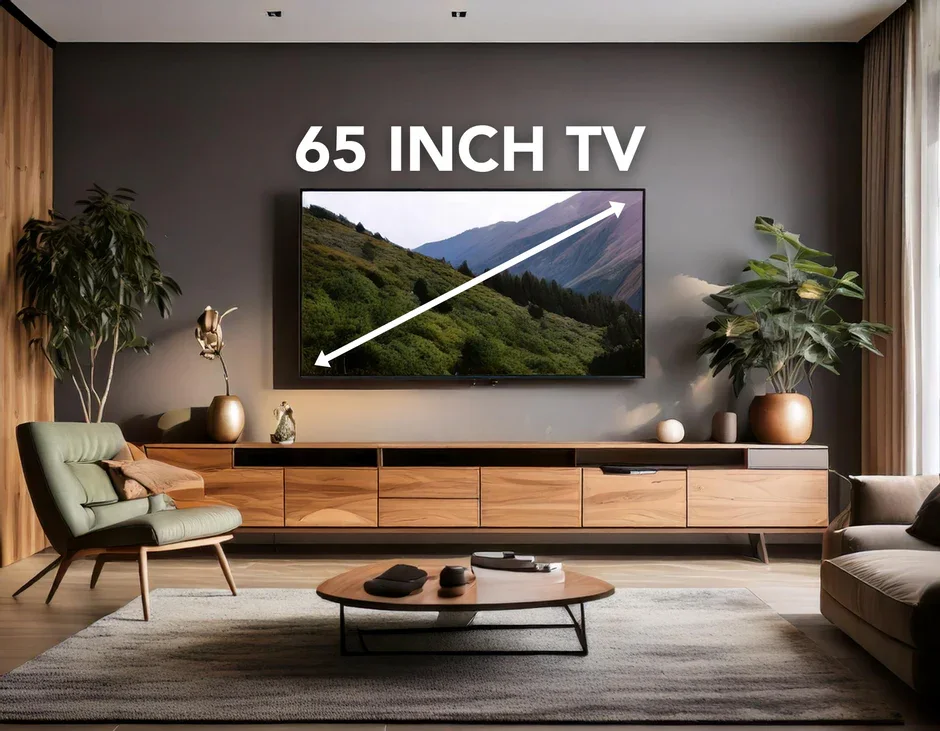
Average 65 Inch TV Dimensions (Quick Overview)
While exact measurements vary slightly by brand and model, most 65-inch TVs fall within a similar size range.
Typical dimensions without a stand:
-
Width: 56–57 inches (142–145 cm)
-
Height: 32–33 inches (81–84 cm)
-
Depth: 1–2.5 inches (2.5–6 cm)
Typical dimensions with a stand:
-
Width: 56–57 inches
-
Height: 34–36 inches
-
Depth: 10–14 inches
These averages provide a good baseline, but for accurate planning, it’s important to understand the variations and that’s where the next section comes in.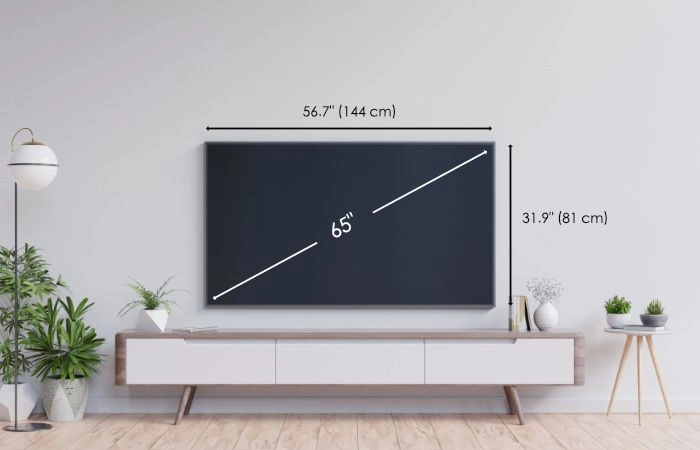
10 65 Inch TV Dimensions You Should Know
Below are ten common dimension profiles you’ll encounter when shopping for a 65-inch television. These examples represent real-world variations across popular TV styles and designs.
1. Slim Bezel LED 65-Inch TV
-
Width: ~56.7 inches
-
Height: ~32.5 inches
-
Depth: ~2.3 inches
Slim-bezel LED TVs are among the most popular options. They offer a modern look and fit nicely into minimalist spaces. Their reduced frame size makes them slightly more compact than older models.
2. 65-Inch TV with Center Stand
-
Width: ~56.8 inches
-
Height with stand: ~35 inches
-
Depth with stand: ~12 inches
Center-stand TVs are ideal for narrower TV consoles. However, the added depth means you’ll need a deeper surface to prevent overhang.
3. 65-Inch TV with Dual-Leg Stand
-
Width: ~57 inches
-
Height with stand: ~34.5 inches
-
Depth with stand: ~11 inches
Dual-leg designs require wider furniture because the legs are positioned near the edges. Make sure your console is at least as wide as the TV itself.
4. Ultra-Thin OLED 65-Inch TV
-
Width: ~56.6 inches
-
Height: ~32.4 inches
-
Depth: ~1.8 inches
OLED TVs are known for their sleek profile. These models are perfect for wall mounting and modern interiors where a clean, flush look is desired.
5. QLED 65-Inch TV Dimensions
-
Width: ~57 inches
-
Height: ~33 inches
-
Depth: ~2.4 inches
QLED TVs often have slightly thicker frames due to their backlighting technology, but they still fit comfortably in most standard living rooms.
6. 65-Inch TV with Soundbar Clearance
-
Width: ~56.7 inches
-
Height with stand: ~36 inches
-
Depth: ~13 inches
Some TVs are designed to allow soundbars to fit neatly underneath. While convenient, these designs increase the overall height and depth.
7. Wall-Mounted 65-Inch TV Dimensions
-
Width: ~56–57 inches
-
Height: ~32–33 inches
-
Depth from wall: ~1.5–2 inches
Wall mounting significantly reduces depth and creates a streamlined look. Be sure to account for cable clearance behind the screen.
8. Gaming-Optimized 65-Inch TV
-
Width: ~56.9 inches
-
Height: ~32.8 inches
-
Depth: ~2.5 inches
Gaming TVs may include additional ports and cooling, adding slightly to their thickness. Still, the difference is minimal for most setups.
9. Budget 65-Inch TV Dimensions
-
Width: ~57.3 inches
-
Height: ~33.5 inches
-
Depth: ~3 inches
Budget models often have thicker bezels and frames, making them slightly larger overall. Always double-check specs if space is tight.
10. Premium Designer 65-Inch TV
-
Width: ~56.5 inches
-
Height: ~32.2 inches
-
Depth: ~1.7 inches
High-end designer TVs focus on aesthetics, with ultra-thin profiles and refined proportions that blend seamlessly into modern interiors.
How Much Wall Space Does a 65-Inch TV Need?
To keep your setup visually balanced, experts recommend leaving at least 3–6 inches of clearance on each side of the TV when wall mounting.
Minimum recommended wall width:
-
62–70 inches wide
This extra space helps prevent the TV from feeling cramped and allows room for décor or accent lighting.
Ideal TV Stand Size for a 65-Inch TV
If you’re placing your TV on furniture, your TV stand should be wider than the TV itself.
Recommended TV stand width:
-
At least 60–70 inches
Recommended TV stand depth:
-
15–18 inches
This ensures stability, proper weight distribution, and room for accessories like gaming consoles or sound systems.
Best Viewing Distance for a 65-Inch TV
Size isn’t just about fit—it also affects comfort.
Ideal viewing distance:
-
8 to 10 feet (2.4–3 meters)
For 4K TVs, you can sit slightly closer without losing picture quality, making a 65-inch TV perfect for medium to large rooms.
Is a 65-Inch TV Too Big for a Bedroom?
Not necessarily.
A 65-inch TV works well in a bedroom if:
-
The room is at least 12 x 12 feet
-
The TV is wall mounted
-
The viewing distance is 7 feet or more
For smaller bedrooms, consider a slimmer model to avoid overwhelming the space.
65-Inch TV Weight Considerations
Dimensions aren’t the only factor—weight matters too.
Average weight:
-
Without stand: 45–55 lbs (20–25 kg)
-
With stand: 55–70 lbs (25–32 kg)
Always ensure your wall mount or TV stand is rated to handle the weight safely.
Measuring Your Space Before Buying
Before purchasing, measure:
-
Wall width and height
-
TV stand width and depth
-
Viewing distance
-
Doorways and staircases (for delivery)
This simple step prevents costly mistakes and returns.
Common Mistakes to Avoid
-
Assuming all 65-inch TVs have the same dimensions
-
Forgetting to measure stand depth
-
Ignoring cable and ventilation space
-
Mounting the TV too high on the wall
Avoiding these mistakes ensures a comfortable and visually appealing setup.
Final Thoughts: Is a 65-Inch TV Right for You?
A 65-inch TV is one of the most versatile sizes available today. It’s large enough for immersive viewing yet compact enough to fit in most modern homes. By understanding the 10 65 inch tv dimensions and how they impact placement, furniture selection, and viewing comfort, you can make a confident, informed decision.
Whether you’re designing a sleek living room, upgrading your entertainment space, or building a home theater, knowing your dimensions is the key to getting it right the first time.
If you plan carefully, a 65-inch TV won’t just fit your space—it’ll elevate it.